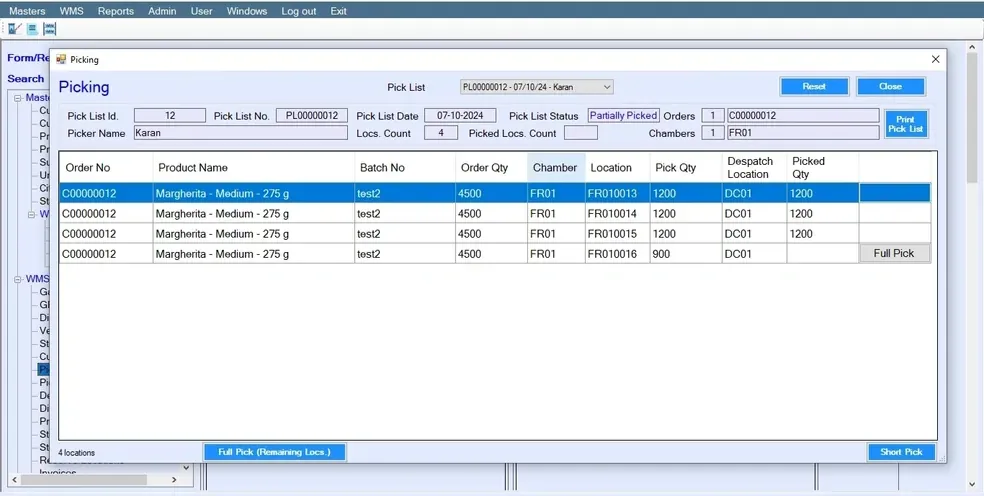
Streamline Order Fulfillment with the Pick List Screen in WMS
Efficient order fulfillment is crucial for any warehouse operation, and the WMS "Pick List" screen is designed to streamline this process. This feature offers a comprehensive solution for managing delivery orders, allocating stock, and optimizing picker assignments.
Users can select the delivery date, and the system automatically fetches all orders scheduled for that date. It allocates locations for picking based on Batch Number or stock out methods like FIFO (First In, First Out), FEFO (First Expiry, First Out), and LIFO (Last In, First Out). Users can then select available pickers, and the system divides the locations among them, optimizing the workload distribution.
Automating order fetching and location allocation reduces manual errors and speeds up order preparation. By dividing picking tasks among workers based on real-time data, the system maximizes productivity and minimizes unnecessary walking or waiting times. Supporting multiple stock out methods helps maintain optimal inventory levels and reduce wastage.
To use the "Pick List" screen, choose the delivery date for order preparation. The system will display all relevant orders in an easy-to-read list. It then determines the best locations for picking stock based on your chosen method, maintaining inventory accuracy. After selecting the available pickers, the system divides the locations among them, ensuring an efficient picking process.
Explore the capabilities of the "Pick List" screen and transform your warehouse operations with WMS. Stay ahead of the competition with timely deliveries and optimal stock management.
Key Takeaways
- The Pick List screen in a Warehouse Management System (WMS) automates order fulfillment by generating optimized picking tasks for delivery orders.
- It allocates stock based on methods like FIFO, FEFO, and LIFO, ensuring accurate inventory handling and reduced wastage.
- The system distributes picking tasks among warehouse staff, improving productivity and minimizing manual errors.
- Automated order fetching by delivery date streamlines operations and speeds up order preparation.
- Using a pick list improves efficiency, reduces walking time, and enhances overall warehouse performance.
Frequently Asked Questions (FAQs)
-
What is the Pick List in WMS?
The Pick List is a feature that helps generate and manage picking tasks for fulfilling delivery orders efficiently.
-
How does the Pick List improve order fulfillment?
It automates order selection, allocates stock locations, and assigns tasks to pickers, reducing errors and saving time.
-
What stock allocation methods are supported?
The system supports FIFO (First In First Out), FEFO (First Expiry First Out), and LIFO (Last In First Out).
-
Can the system assign tasks to multiple pickers?
Yes, it distributes picking tasks among available pickers to optimize workload and efficiency.
-
Why is Pick List important in warehouse management?
It improves accuracy, speeds up operations, reduces manual work, and enhances overall warehouse productivity.