Enhancing Inventory Tracking with the Product/Location Timeline in WMS
In today's fast-paced warehousing environment, keeping track of inventory movement is critical. WMS brings the Product / Location Timeline screen, designed to offer users a clear and comprehensive view of product movements across all locations. Whether it's monitoring receipt and issue quantities or tracking transactions like GRN, Stock Transfer, Picking, Dispatch, or Adjustment, this screen serves as an essential tool for ensuring accurate inventory control.
Key Takeaways
- The Product/Location Timeline in a Warehouse Management System (WMS) provides real-time visibility into inventory movements across multiple warehouse locations.
- It tracks key transactions such as GRN, picking, stock transfers, dispatch, and adjustments to ensure accurate inventory control.
- Advanced filtering options like product, batch, customer, location, and date range allow users to analyze specific stock movements efficiently.
- Timeline charts help visualize inventory trends, detect anomalies, and improve warehouse decision-making.
- This feature enhances operational efficiency, reduces errors, and enables smarter inventory management in modern warehouses.
Key Features of the Product / Location Timeline:
- Detailed Transaction Overview: Users can view a timeline of all transactions involving a product, across various locations. The timeline shows the receipt quantity (items received into the warehouse) and issue quantity (items dispatched or transferred out) for each transaction type.
- Transaction Types: The screen covers the major warehouse transaction types:
- Goods Receipt Note (GRN) for incoming stock.
- Picking for order fulfillment.
- Stock Transfer for internal movements between different storage locations.
- Dispatch for items leaving the warehouse.
- Adjustment for any stock corrections or updates.
- Comprehensive Filtering Options: To give users more control and precision, the timeline can be filtered using multiple criteria:
- Customer: Focus on transactions related to a specific customer.
- Product: Narrow down by specific products or SKUs.
- Batch: Track inventory at the batch level for better traceability.
- Chamber/Location: Monitor stock movements in individual warehouse chambers or storage locations.
- Date Range: Filter by a specific time period to track stock movements within a given date range.
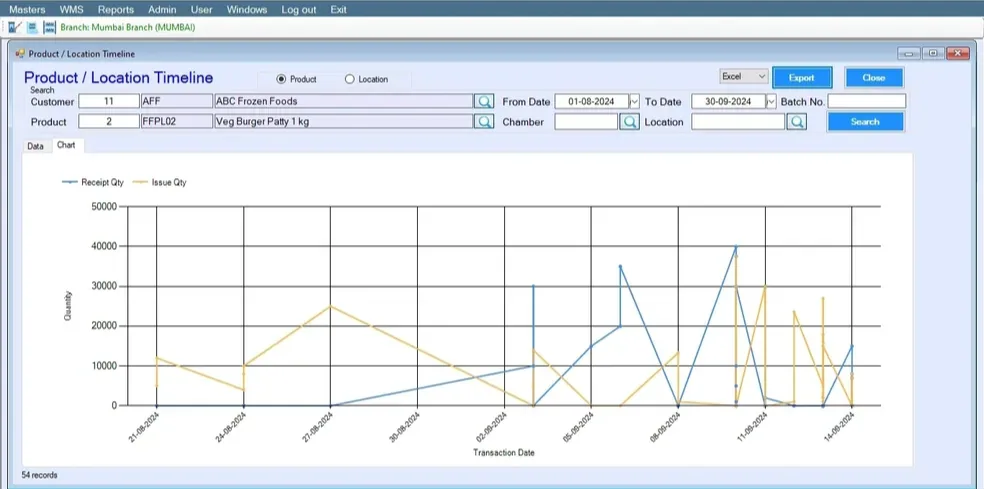
- Timeline Chart: Users can also visualize this data using a timeline chart. The chart displays the receipt and issue quantities over time, making it easier to analyze trends, identify bottlenecks, or detect anomalies in stock movements. Filtering options allow users to drill down into the data, making it highly customizable for specific needs.
Why is this Important?
The Product / Location Timeline in WMS is designed to help warehouse managers and operators maintain real-time visibility into stock movements, ensuring that nothing slips through the cracks. By filtering through customers, products, and locations, users can pinpoint specific activities or problems and take proactive steps to resolve them. The timeline chart provides an intuitive way to track inventory trends over time, improving decision-making and operational efficiency.
In summary, this powerful feature ensures that users have all the tools necessary to maintain a clear, accurate, and up-to-date view of their warehouse operations.
Frequently Asked Questions (FAQs)
-
What is the Product/Location Timeline in WMS?
It is a feature that tracks and displays all inventory movements across different warehouse locations in real time.
-
What transactions are included in the timeline?
The timeline includes GRN (goods receipt), picking, stock transfers, dispatch, and inventory adjustments.
-
How does the timeline improve inventory management?
It provides real-time visibility, helps track stock movement, reduces errors, and improves decision-making.
-
Can users filter data in the Product/Location Timeline?
Yes, users can filter data by product, customer, batch, location, and date range for precise analysis.
-
Why is the timeline chart important in WMS?
The timeline chart helps visualize trends, identify bottlenecks, and detect unusual inventory movements.